What is the Host View?
The Host View is part of your facilitation tools. With this, you will get updated data from your participants as they play or move around in the tools.
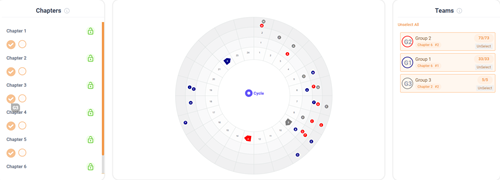
Where to find the Host view
- Log in.
- Click on sessions on the left to go to the session list.
- Find the session you are working on.
- Press on hostview on the right side.
Can I block participants from moving from one chapter to the next?
Yes, you can by clicking on the lock icon to close it or open it again (closed is shown in red and open in green) so the participants will not be able to move to the next chapter.
The Main gameboard will show the stakeholders of all players (or teams) where you can follow their movements and scores.
After the game is finalized you can use the profile to understand how the different theories reflect on the options that were chosen.
In Host View you can check up on:
- Session participants.
- Consultants attached to the session.
- Different Modules.
- The number of groups or players.
- Options chosen.
- Points scored.
 This website uses cookies. You agree to the use of cookies by clicking on the page.
